Screen size is not a matter of taste. Two numbers decide it — the angle your seats look at, and the lumens that surface needs.
Home cinema screen size is the first decision most people get wrong, and it is nearly always wrong in the same direction. Too big. Chosen first. With the seating and the projector worked out afterwards.
The thinking is easy to follow. A bigger screen sounds better in a conversation and looks better on a drawing. But screen size is not a matter of taste. Two numbers decide it, and both can be worked out before you order anything: the angle your seats look at, and the lumens that surface needs to stay at cinema brightness.
Get those two right and a 150-inch screen will look better than a 200-inch screen in the same room. Get them wrong and you have paid for a large, dim picture that nobody in the room is comfortable watching.
What do SMPTE and THX actually say about viewing angle?
They say your screen should be bigger, not smaller. This is the part almost every article on the subject gets backwards.
Viewing angle means how much of your vision the screen fills, measured from the left edge of the screen to the right edge, from where you sit. Sit closer and the angle gets wider.
SMPTE EG-18 asks for at least 30°. That is the smallest they will accept, not the largest they allow. THX treats 26° as the furthest a seat should ever be, 36° as the right figure for a back row, and about 40° as the ideal. Neither body has published an upper limit for a home room.
One point worth clearing up, because it gets quoted wrongly all the time: CEDIA/CTA-RP22 is the immersive audio document. CEB23-B is the video one. RP22 says so itself — it names CEB23-B as a normative reference, and it states that for guidance on correctly sizing a screen, and on defining the reference seating position, you refer to CEB23-B. If a proposal quotes RP22 for screen sizing, whoever wrote it had not read past the title.
How do you turn a viewing angle into a screen size?
Measure from the screen to where your eyes will be, not to the front edge of the sofa. Then multiply that distance, in inches, by the figure below.
| Target | Angle | 16:9 diagonal | At 4.5m (177″) |
|---|---|---|---|
| SMPTE minimum | 30° | distance × 0.615 | 109″ |
| THX recommended | 36° | distance × 0.746 | 132″ |
| THX ideal | 40° | distance × 0.835 | 148″ |
So if the standards push towards bigger, where does a very large screen actually start to cost you something? Not in the geometry. In the light, and in the length of the room.
Why does a bigger screen give a dimmer picture?
Because the light stays the same and the screen gets bigger.
Your projector puts out a fixed amount of light. Make the picture larger and that same light has to cover a larger surface, so every part of the image gets a thinner share of it and the whole picture looks darker.
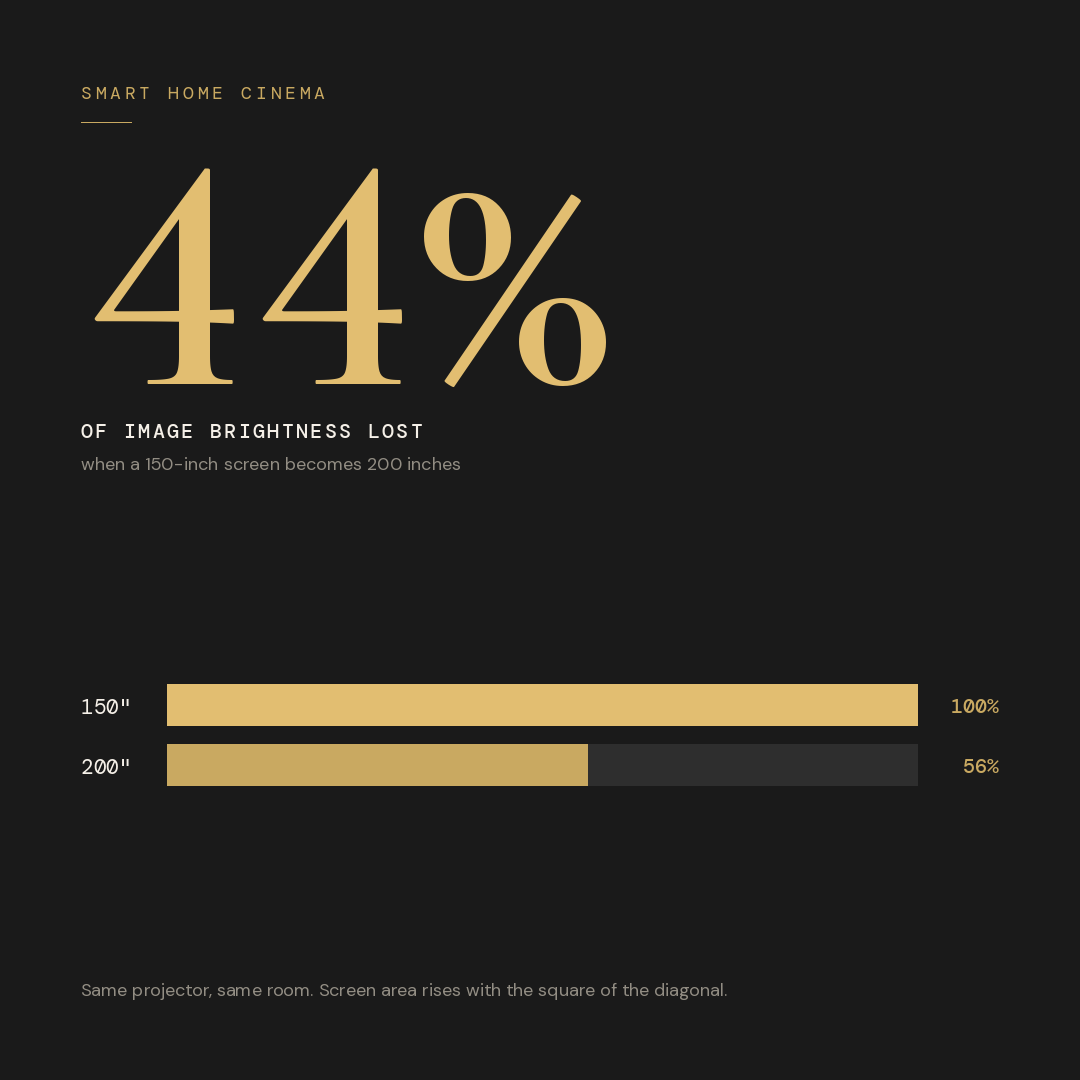
The trap is that a screen grows faster than its diagonal suggests. Go from 150 inches to 200 inches and the diagonal rises by a third — but the surface area rises by 78%.
How many ANSI lumens does each screen size need?
Every projector datasheet quotes ANSI lumens. That number tells you how much light leaves the projector. What decides how your picture looks is how much of that light lands on each part of the screen — and that is measured in foot-lamberts (fL).
There are two targets worth knowing, not one:
- 14 fL (48 cd/m²) — the standard-dynamic-range reference. This is what a conventional digital cinema is calibrated to.
- 30 fL (about 108 nits) — the figure a Dolby Cinema delivers, roughly twice a standard cinema. IMAX with laser sits between the two at 22 fL.
Working backwards from both targets gives you the lumens each screen size needs:
| Diagonal | Screen size | SDR — 14 fL | HDR — 30 fL |
|---|---|---|---|
| 100″ | 2.21 × 1.25m | 420 | 890 |
| 120″ | 2.66 × 1.49m | 600 | 1,280 |
| 133″ | 2.94 × 1.66m | 735 | 1,575 |
| 150″ | 3.32 × 1.87m | 935 | 2,000 |
| 175″ | 3.87 × 2.18m | 1,275 | 2,725 |
| 200″ | 4.43 × 2.49m | 1,660 | 3,560 |
Two things that table cannot tell you, and both decide whether your room works:
1. The ANSI lumens on the box are not the lumens you end up with. That figure is measured in the projector’s brightest picture mode, and nobody watches films in that mode because the colours are wrong. Once the projector is set correctly, real output is a good deal lower. This is why the rated output you shop for has to be roughly double the figure in the table.
2. HDR needs about twice the light of standard content. HDR films are graded far brighter than any home projector reaches, so the projector has to compress that range down to fit — and the harder it compresses, the flatter the picture looks. Thirty foot-lamberts is not a theoretical number pulled out of the air. It is what the best commercial rooms in the world actually deliver, and it is the honest target for a dedicated room that will be used for HDR films.
The number that matters is the one measured on your screen, not the one printed on the box.
Do you need 1080p, 4K or 8K?
1080p is the minimum worth building with. 4K is the right choice. Above 4K, your eye cannot find additional detail at any normal seating distance.
Your eye has a limit, just as a camera does. Hold a newspaper at arm’s length and every letter is clear. Walk to the far end of the room and the letters run together. The print has not changed. Your eye has simply run out of the ability to separate it.
A projector works the other way round. The larger the picture becomes in front of you, the further apart its pixels sit, and the easier they are to see one by one. That gives a direct relationship between viewing angle and the resolution you need.
| Reference point | Viewing angle | What it means for you |
|---|---|---|
| HD / 1080p reference | 33° | 1080p holds up cleanly to about here |
| SMPTE film projection | 43° | Past 1080p’s comfort zone; 4K territory |
| UHD 4K maximum | 61° | The widest angle 4K is referenced to |
| Beyond 4K | — | No additional detail your eye can resolve; the pixel grid simply looks smoother |
Read that against the room we size in Section 05. A 150-inch screen puts the front row at 43 degrees and the back row at 34. The back row sits right at the HD reference; the front row is well past it. That is a 4K room, and 1080p would visibly struggle in the front seat.
So resolution is not where your money buys a better picture. Contrast, black level and brightness are. A well-calibrated 4K projector on a correctly sized screen will look better than a higher-resolution projector on a screen that is too big for it.
Which projector suits which screen size?
Match the projector to the screen area, because area is what uses up the light.
One thing to be clear about first. Every projector below can throw a picture far larger than the sizes shown. Throw distance is rarely the limit. The question is whether it still holds cinema brightness once it gets there, and that is a different question entirely.
| Screen size | SDR — on screen | HDR — on screen | What the projector has to be good at |
|---|---|---|---|
| 100 – 133″ | 420 – 735 | 890 – 1,575 | Enough output to cope with some room light; reliable colour out of the box |
| 133 – 165″ | 735 – 1,130 | 1,575 – 2,420 | 4K, laser light source, stable brightness, properly calibratable |
| 165 – 200″ | 1,130 – 1,660 | 2,420 – 3,560 | Real light reserve and deep native contrast |
| 200″ and above | 1,660+ | 3,560+ | Reference optics, high output, and a room designed around it |
We are authorised dealers for Sony and JVC, and we specify from the wider market where the room calls for it. Broadly:
- Living rooms and multipurpose rooms — Epson, BenQ and Optoma make strong laser projectors here, built to cope with a room that is not fully dark.
- Dedicated dark rooms — Sony’s SXRD and JVC’s D-ILA models, where black level and calibration accuracy carry the picture.
- Reference rooms — the Sony and JVC flagships, SIM2 and Barco Residential.
Is a native 4K projector better than a pixel-shifting one?
There are three ways a projector puts a 4K picture on your screen, and all three are legitimate engineering.
- A native 4K imaging device. The chip physically carries 3840 × 2160 pixels. Sony’s SXRD and JVC’s current D-ILA devices work this way.
- Shifting up from a lower-resolution device. The chip fires more than once per frame and shifts by half a pixel each time, placing 4K worth of detail on screen. Most 3LCD projectors and most consumer DLP projectors work this way. Native 4K DLP chips do exist, but they are used in cinema-grade projectors rather than home models.
- Shifting up from native 4K. JVC’s e-shiftX starts with a native 4K device and shifts it to place 8K worth of pixels on screen. This is where the confusion usually starts: the device underneath is genuinely 4K, and the shift takes it upward from there.
All three put a 4K image in front of you, and at normal home cinema distances the difference between them is small. What actually separates projectors on a large screen is contrast, black level, and how much usable light is left after the projector has been calibrated properly.
The rule underneath all of it: choose the screen from the seating, then choose the projector from the screen. Doing it the other way round is how rooms end up dim.
Most rooms are planned in the wrong order — projector first, screen second, seating last. Send us your room dimensions and where you plan to sit. We will send back the viewing angle at every seat and the lumens your screen will actually need, before anything is ordered.
Get your room’s numbers on WhatsApp →What screen size fits a 16 × 22ft room?
150 inches on a 16:9 screen, with two rows of seats. Here is how that number is arrived at, so you can run the same check on your own room.
Take a room of 16ft wide × 22ft long — 4.88m × 6.71m. This is roughly where most serious Indian home cinema rooms land, and it is a good room to work with.
Does it work across the width?
A 150-inch 16:9 screen is 3.32m wide. The room is 4.88m, so the screen occupies about two thirds of the wall and leaves 778mm on each side. That is room for the frame, room for masking if you add it later, and no need to build tight into the corners.
One thing this figure does not decide is where the speakers go. On an acoustically transparent screen the left, centre and right speakers sit behind the picture, positioned where the design calls for them. Screen width does not move them.
Does it work for both rows?
| Row | Distance from screen | Viewing angle | Against the standards |
|---|---|---|---|
| Front row | 4.2m | 43° | Inside the commercial cinema range |
| Back row | 5.5m | 34° | Between SMPTE 30° and THX 36° |
This is what makes a 16 × 22ft room worth building in. Both rows land inside the published range at the same time. The front row gets an immersive 43 degrees. The back row gets a relaxed 34 degrees. Neither seat is sacrificed for the other, and both experiences exist in the same room. Where each row sits matters as much as how big the screen is — seat position decides more of what you hear than most people expect, and it decides what you see as well.
What does that screen need from the projector?
A 150-inch screen is 66.8 square feet. At the standard 14 foot-lamberts that needs 935 lumens landing on the screen; at the 30 foot-lamberts HDR films deserve, 2,000 lumens. Allowing for calibration losses, that points to a projector rated somewhere around 3,600 to 4,800 ANSI lumens if HDR matters to you. That is a well-populated part of the market, and it is one of the reasons 150 inches is a sensible target in this room rather than an ambitious one.
What does a 200-inch screen really cost you?
It fits. A 200-inch 16:9 screen is 4.43m wide and 2.49m tall, and it will go up on a 16-foot wall without any difficulty. That is not the question.
The question is what changes once it is up. Two things do, and they are linked: the projector moves up a class, and the room needs to be longer than 22 feet.
1. The projector moves up a class
A 200-inch screen is 118.6 square feet against 66.8 for a 150-inch screen. Holding the same brightness means 1,660 lumens on screen instead of 935 for standard content — and if you want the picture to hold up on HDR films at the 30 foot-lamberts a Dolby Cinema delivers, 3,560 lumens instead of 2,000.
That second pair of numbers is the one that decides your budget. Two thousand lumens on screen after calibration is a well-populated part of the market. Three and a half thousand is not — it is flagship territory, and it is usually a larger jump in price than the screen itself cost.
Keep the projector you had planned and you lose 44% of your brightness. Colours go softer, HDR films go flat, and the room only looks its best with every light off and every reflective surface dealt with. That is not a screen problem. It is a budget that moved without anyone deciding it should.
2. Nobody in the room gets a relaxed seat
This is the one people feel and cannot name. Put a 200-inch screen in the same 22-foot room and every seat moves up an intensity level at once.
| Row | 150″ screen | 200″ screen | What that feels like |
|---|---|---|---|
| Front row · 4.2m | 43° | 56° | Front rows of a commercial cinema |
| Back row · 5.5m | 34° | 44° | What used to be the front row |
At 56 degrees the front row follows the picture with head movement rather than eye movement. Some people choose that deliberately and love it. Most find it tiring across a full film.
The real loss is the back row. On the 150-inch screen it sits at 34 degrees — the comfortable seat, the one for a long film, a cricket match, or guests who are not enthusiasts. On the 200-inch screen it moves to 44 degrees and that seat stops existing. A two-row room that offers only one kind of experience is a less useful room than one that offers two.
3. The room needs to be longer, not wider
This is what people miss, because width is the dimension a screen obviously competes with. The dimension that actually limits screen size is length — because viewing angle is set by distance, and distance comes from length.
Work it backwards. To give a 200-inch screen the same 43 degrees at the front row and 34 degrees at the back that a 150-inch screen gives in this room, you need the front row at 5.6m and the back row at 7.2m. Add front clearance and a rear walkway and that is a room roughly 28 feet long.
Six feet. That is the honest cost of the extra fifty inches, and it is a wall, not a purchase order.
A 200-inch screen is not a mistake. It is a different room — a longer one — with a different projector in it.
If you have the length and the projector budget, a 200-inch screen is an excellent decision and we will happily design around it. In a 22-foot room, 150 inches gives you a brighter picture and two genuinely different seats — and you will never sit in it wishing it were bigger.
What changes at reference level: 2.35:1, anamorphic lenses and video processors?
At the top of the market the screen stops being a rectangle you buy and becomes a decision about the whole system.
Why do serious rooms use a 2.35:1 screen?
In a cinema, wide films are wider — the picture grows sideways while the height stays the same. A 16:9 home screen does the opposite. It shrinks a wide film down and puts black bars above and below it. A 2.35:1 screen puts the cinema relationship back: wide films fill the screen at full height, and 16:9 television content gets black bars at the sides instead.
There is a second advantage worth knowing. A 2.35:1 screen buys you more width for every centimetre of height it uses. In a room where you want the widest possible image, that is the shape that gets you there.
What does an anamorphic lens actually do?
When a projector shows a wide film on a 16:9 chip, about 26% of that chip is displaying black bars. Only 74% of it is doing any work. An anamorphic lens sits in front of the projector and lets it use the whole chip, stretching the image out optically instead. You get back the full vertical resolution and, geometrically, about 35% more light.
Expect somewhat less than that on the screen. The lens is real glass in the light path and every element costs a little transmission, so the measured gain lands below the geometric figure. It is still the single biggest brightness gain available on a scope screen — just not a clean 35%.
Is lens memory a substitute for an anamorphic lens?
Partly. Sony and JVC projectors can store zoom positions and switch between them, so a wide film zooms out to fill a 2.35:1 screen without any extra lens. You get the right shape at far lower cost. But zooming only pushes the black bars off the edges of the screen. It does not recover the light or the pixels. On a large screen, that missing light is exactly the brightness you cannot afford to give away.
Where does a video processor earn its place?
Processors such as the madVR Envy and the Lumagen Radiance Pro handle HDR frame by frame instead of applying one fixed setting to the whole film. They also detect the aspect ratio automatically and switch the projector’s zoom for you. On a large screen where brightness is already tight — which, from the numbers in Section 02, is most large screens — this is often a bigger visible improvement than changing the projector.
What does the front wall need behind the screen?
The screen is not the only thing that has to work on that wall. Everything else lives behind it, and the space for that is set at the design stage — not after the screen arrives.
The screen comes off the wall, not onto it
In a properly built room the screen is acoustically transparent — sound passes straight through it — and it is mounted forward of the front wall rather than flat against it. The left, centre and right speakers then sit behind the picture at ear height, which is how a cinema does it and why the dialogue seems to come from the actor’s mouth rather than from below the screen.
That gap behind the screen is also where the front wall absorption goes, directly behind and around the speakers. So a wide screen does not remove your ability to treat the front wall. The screen and the treatment occupy the same wall in two different planes, and both do their job. Getting those speaker positions right is what has to be planned before the screen is ordered — not fitted around it afterwards.
What sets the depth you need
The depth between the screen and the wall is decided by the speakers, not by a rule of thumb. Take the deepest cabinet you are using, add the clearance it needs to breathe, add the thickness of the absorption going on the wall behind it, and that is your number. It is measured from the actual speaker, which is why the speaker choice has to be settled before the screen frame is fabricated.
Get this wrong and the compromises are the visible kind — the centre channel moves above or below the picture, and every voice in the film moves with it.
Screen gain belongs in the lumen calculation
Gain is how much of the projector’s light a screen sends back towards the seats. A gain of 1.0 is the reference, and every lumen figure in this article assumes it.
- Below 1.0. An acoustically transparent screen has a woven surface, and some light passes through the weave instead of returning to you. So it needs more lumens than the table says, and it also softens the high frequencies of the sound passing through it, which is corrected at calibration.
- Above 1.0. A high-gain screen concentrates light back towards the seats, which is a genuine way to buy brightness on a large screen. The cost is that the concentration is directional: seats off to the sides get less, and the centre of the screen can look brighter than the edges. In a wide room with two rows, that often creates a worse problem than the one it solves.
Choose the screen material first, then apply its gain to the lumen target, then choose the projector. Doing it in the other order is how a room ends up dimmer than the datasheet promised.
Our working order is this: seating → viewing angle → screen size → screen material and gain → lumens needed → projector → front wall depth and acoustic treatment.
Frequently Asked Questions
What screen size is best for a 16 x 22 foot home cinema room?
150 inches on a 16:9 screen. That screen is 3.32 metres wide and occupies about two thirds of the wall. With two rows of seats at 4.2 metres and 5.5 metres from the screen, the viewing angles are 43 degrees and 34 degrees, so the front row is immersive and the back row is relaxed, and both sit inside the SMPTE and THX range at the same time.
Is a 200 inch screen too big for a home cinema?
It depends on the length of the room and the projector budget, not on the width. A 200 inch 16:9 screen is 4.43 metres wide and fits a 16 foot wall without difficulty. The two real costs are brightness and distance. It needs 1,660 lumens on screen against 935 for a 150 inch screen for standard content, and 3,560 against 2,000 if you want HDR films to hold up at the 30 foot-lamberts a Dolby Cinema delivers. That is a 44 percent brightness loss from the same projector, and usually a move into a higher class of projector. On distance, to give two rows the same 43 and 34 degree angles a 150 inch screen gives in a 22 foot room, it needs the front row at 5.6 metres and the back row at 7.2 metres, which is a room roughly 28 feet long.
What is the ideal home cinema screen size?
There is no single figure. Multiply the distance from your main seat to the screen, in inches, by 0.615 for the SMPTE 30 degree minimum, by 0.746 for the THX 36 degree recommendation, or by 0.835 for the 40 degree ideal. At 4.5 metres that gives roughly 109, 132 and 148 inches on a 16:9 screen.
How bright should a home cinema screen be?
For standard content in a dark dedicated room, 48 candela per square metre — 14 foot-lamberts — which is the figure a conventional digital cinema is calibrated to. For HDR, aim at 30 foot-lamberts, around 108 nits, which is what a Dolby Cinema delivers and roughly twice a standard cinema. IMAX with laser sits between the two at 22 foot-lamberts. On a 150 inch screen at unity gain, 30 foot-lamberts needs about 2,000 lumens landing on the screen, which means a rated output well above that once calibration losses are counted.
Can a home cinema screen be too big?
Yes, for two reasons, and both can be checked before anything is ordered. The projector may not hold cinema brightness across the larger surface, because screen area rises with the square of the diagonal. And the room may not be long enough to seat anyone at a comfortable angle in front of it, since viewing angle is set by distance and distance comes from length. A large screen is rarely limited by the width of the wall. It is limited by how far back you can sit from it.
Does room length or room width decide the screen size?
Length. Width only decides whether the screen physically fits the wall, which it usually does. Length decides how far your seats can sit from the screen, and that distance sets the viewing angle. A 150 inch screen needs a 22 foot room to place two rows at 43 and 34 degrees. A 200 inch screen needs about 28 feet for the same two angles.
Does screen gain change how many lumens I need?
Yes, and it works in both directions. An acoustically transparent screen has a woven surface, so some light passes through instead of returning to the seats, and it needs more lumens than a solid screen of the same size. A high gain screen concentrates light back towards the seats and needs fewer, but the concentration is directional, so side seats receive less and the centre of the screen can look brighter than the edges. Settle the screen material before choosing the projector.
Is 1080p enough for a home cinema?
It is the minimum worth building with. RP22 cites 33 degrees as the HD reference viewing angle, and 1080p holds up cleanly to about there. At the 43 degrees a properly sized dedicated room puts its front row at, the pixel grid starts to become visible and 4K becomes the sensible choice.
Is an 8K projector worth it for a home cinema?
The 8K models available for home use start with a native 4K imaging device and shift it to place 8K worth of pixels on screen. RP22 cites 61 degrees as the maximum viewing angle 4K is referenced to, and no sensibly designed home room seats anyone beyond that, so 4K already puts more detail on screen than the eye can separate. The gain from 8K is a smoother pixel structure rather than more visible detail. Contrast, black level and brightness deliver improvements you can actually see.
Should I choose a 16:9 or 2.35:1 screen?
Choose 2.35:1 if you mostly watch films and want wide films to fill the screen at full height, as they do in a cinema. Choose 16:9 if the room also serves sports, gaming and television. A 2.35:1 screen also gives you more width for every centimetre of height it uses, which is useful when you want the widest possible image. It needs either a projector with lens memory or an anamorphic lens to work properly.
What does an anamorphic lens actually do?
When a projector shows a wide film on a 16:9 chip, about 26 percent of that chip is displaying black bars. An anamorphic lens lets the projector use the whole chip and stretches the image out optically instead. That returns the full vertical resolution and, geometrically, about 35 percent more light. The measured gain on screen is somewhat lower, because the lens itself costs a little light transmission, but it remains the largest brightness gain available on a scope screen.
Can acoustic treatment go behind the screen?
Yes, and in a properly built room it does. The screen is acoustically transparent and mounted forward of the front wall, with the left, centre and right speakers behind the picture at ear height. The absorption sits on the wall behind and around those speakers. The screen and the treatment occupy the same wall in two different planes, so a wide screen does not reduce what you can do acoustically on the front wall. What it does require is enough depth between the screen and the wall for the speakers and the treatment behind them.
Where should you actually start?
The screen is the last thing you should choose and the first thing most people buy.
Decide where you will sit. Measure to eye level. Work out the angle. Choose the screen material and read its gain. Work out the lumens that surface needs, at both 14 and 30 foot-lamberts, so you know what standard content and HDR will each demand. Then set the depth the front wall needs for the speakers and the treatment behind the screen. Only at that point does a screen size exist.
In a 16 by 22 foot room, that process gives you 150 inches. A correctly lit 150-inch screen with a front row at 43 degrees and a back row at 34 will look better and be used more than a 200-inch screen in the same room — and everyone will still be comfortable two hours in.
A home cinema is engineered as a complete system, not assembled from the largest available parts. Send your room dimensions and seating plan. We will send back the viewing angle at every seat and the brightness target your screen will need.
Discuss Your Project on WhatsApp →
Leave a Reply